
FinOps Weekly Summit 2026 | Join the Event
Azure Flex Consumption: The FinOps Game-Changer That Finally Brings True Serverless to Your VNet
For years, one of the most frustrating trade-offs in Azure Functions was simple: if you needed VNet integration, you paid for it. Full stop.
You had two choices:
- Consumption plan— true serverless, pay per execution, but no VNet integration. Your function lives on the public internet.
- Elastic Premium (EP1) — VNet integration is supported, but you’re paying for at least one pre-warmed instance running 24 hours a day, 7 days a week, whether your function fires once a day or a thousand times.
For event-driven, low-frequency workloads — think file processing, blob ingestion pipelines, nightly data movement — Elastic Premium was like hiring a dedicated server admin to sit at a desk and wait for a phone call that comes in twice a day.
That conversation is over. Azure Flex Consumption changes everything.
What I Built
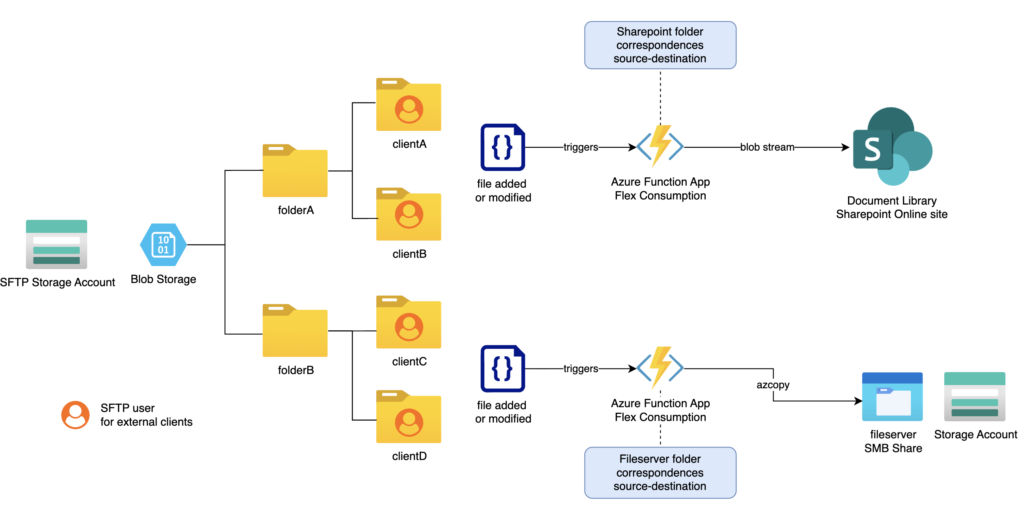
I recently designed and deployed an event-driven file automation platform for a multi-country enterprise landing zone. The pattern is simple but the security requirements are strict:
- Files land in an Azure Blob Storage account in our management subscription with SFTP features enabled
- Depending on the folder, files are automatically routed either to an Azure Files share (for legacy app servers) or to SharePoint/Teams via the Microsoft Graph API
- The entire workload needs to run inside a private network — no public endpoints on storage, no shared access keys, customer-managed encryption keys, private endpoints throughout
This diagram depicts the whole solution:
This is exactly the workload where Elastic Premium previously had a monopoly. Not anymore.
Flex Consumption: The Architecture
Two Azure Function Apps — Python 3.13, FC1 plan — handle the routing:

Every component is locked down:
- Private endpoints on all storage accounts, function app sites, and Key Vault
- VNet integration on both function apps via their outbound subnet — this is what Flex Consumption now enables
shared_access_key_enabled = falseon all storage accounts — pure managed identity authentication
- Customer-managed encryption keys (UAMI + Key Vault) on all storage accounts
- Zero secrets in code — SharePoint credentials and storage keys are stored in Key Vault; the function app reads them at runtime via the managed identity using stored secret names
Sites.SelectedGraph API scope — the SharePoint app registration is granted write access only to the specific sites it needs, not the entire tenant (Sites.ReadWrite.Allwas explicitly avoided)
The FinOps Argument
Let’s talk numbers. For this file automation workload, blobs arrive sporadically — maybe a few dozen times per day, each execution completing in under 10 seconds.
With Elastic Premium, you are paying for a pre-warmed instance regardless of how many times your function runs. For a file automation job that processes blobs a few times a day, that’s essentially dead spend — you’re paying full price for infrastructure that is idle 23+ hours a day.
Flex Consumption gives you:
- True scale-to-zero — no idle cost when nothing is running
- Per-execution billing — you pay for the actual CPU and memory used during each invocation
- VNet integration — your function can reach private endpoints, on-premises resources, and internal APIs without any public exposure
- Per-function scaling — each function within an app can scale independently
And then there’s the free grant: Azure Functions includes 1 million free executions and 400,000 GB-s of resource consumption per month, per subscription. For a low-frequency file automation workload like this one, that free tier alone may cover the entire workload — month after month, with nothing to pay.
For most event-driven, internal automation workloads, the monthly bill on Flex Consumption will be so close to zero it won’t appear as a line item worth discussing.
The Catch That Took the Most Time
One thing the documentation doesn’t make obvious: blobTrigger with "source": "EventGrid" (a common pattern for blob processing) does not use the same webhook endpoint as a native eventGridTrigger binding.
For blobTrigger + EventGrid source, the endpoint is /runtime/webhooks/blobs. For a true eventGridTrigger function — which is what both our functions use — the correct endpoint is:

Not /api/{functionName}, not /runtime/webhooks/blobs. And azure_function_endpoint in Terraform’s Event Grid resource only works with eventGridTrigger — it will reject blobTrigger functions at apply time.
A second subtle issue: the azurerm_function_app_host_keys data source in AzureRM provider v4.x does not expose system_keys (the map that in earlier versions contained eventgrid_extension_key). Use primary_key (the master key) instead — it is valid for all webhook-style invocations and is re-sourced at every terraform apply, so it stays in sync automatically.
The other thing that bit us: Flex Consumption auto-injects a plain AzureWebJobsStorage connection string during deployment. When you have shared_access_key_enabled = false, this injected string — which has an empty AccountKey — causes the host to fail acquiring its lock lease on startup with a 403 AuthenticationFailed. The fix is to explicitly declare "AzureWebJobsStorage" = "" in your Terraform app settings, which Terraform then owns and prevents the platform from re-injecting.
Finally: cold-start and validation timing. When Event Grid creates a webhook subscription it sends a SubscriptionValidationEvent immediately. If the Flex Consumption app hasn’t received a request recently, the host runtime may still be waking up when that validation POST arrives and the handshake fails. The fix is a null_resource pre-warm step in Terraform that calls a minimal HttpTest endpoint (GET /api/HttpTest → returns {"status": "ok"}) on both function apps before the Event Grid subscriptions are created, followed by a short sleep to let the runtime fully initialize.
An Honest Note: Azure Functions Runtime Is Not Simple
I want to be transparent here, because most articles only talk about the happy path.
Azure Functions is a powerful platform, but the host runtime is a black box with real complexity underneath it. When something goes wrong — especially at startup — the errors are often cryptic, the logs are noisy, and the failure can be happening at a layer you don’t directly control.
In this project alone we hit:
- Storage authentication failures that only appear after deployment, not during plan or apply, because the platform injects settings post-deploy that silently override what Terraform configured
- Host lock lease errors (
AuthenticationFailed,403) with no clear indication in the portal that the wrong credential type was being used — just a repeating crash loop
- Trigger-type and endpoint mismatches —
blobTriggerandeventGridTriggeruse different internal webhook paths. A mismatch betweenfunction.jsonand__init__.py(e.g. declaringeventGridTriggerin JSON but using theInputStreamsignature in Python) causes the runtime to silently fail the Event Grid handshake. The subscription showsSucceededin the portal and never delivers an event
webhook_endpointcold-start validation failure — Event Grid sends itsSubscriptionValidationEventthe moment the subscription is created. On Flex Consumption, the Python runtime takes 60–120s to cold-start; the 30-second handshake window expires every time. The solution isazure_function_endpoint, which uses ARM-level delivery and has no HTTP handshake at all
The troubleshooting process for these issues is genuinely difficult. You are often working across multiple log streams simultaneously — Application Insights, Log Analytics, az webapp log tail, Event Grid delivery metrics — trying to correlate events that happened milliseconds apart, on infrastructure you cannot SSH into, running code you didn’t write (the host runtime itself).
This doesn’t mean you shouldn’t use Azure Functions — the platform is excellent and Flex Consumption is a real leap forward. But go in with eyes open: budget troubleshooting time, set up Application Insights from day one, and treat the first deployment as a learning exercise rather than a go-live.
When it works, it works beautifully. When it doesn’t, it will test your patience.
The CI/CD Setup: Two Systems, One Principle
The deployment pipeline reflects a clean split between infrastructure (container) and application code (content) — each managed by the tool that fits it best.
Platform & Infrastructure → Azure DevOps + Terraform
All Azure resources (function apps, storage accounts, private endpoints, Event Grid subscriptions, RBAC assignments) are managed in Terraform and deployed via Azure DevOps pipelines. The pipeline runs on self-hosted agents inside an AKS cluster, which means it runs inside the private network and can reach private Azure endpoints directly — no public firewall exceptions needed.
The service connection uses OIDC federation — no service principal secrets stored anywhere. The Terraform remote state lives in Azure Blob Storage in the management subscription, with full state locking.
The pipeline gate is strict: every push to main that touches code/elz/main/* triggers a plan first, a human reviews it, and only then does apply run.

Function Code → GitHub Actions + Self-Hosted Runners
The function app code lives in a separate GitHub repository, with a dedicated workflow per function app — one for BlobToAzureFiles, one for BlobToSharePoint. Each workflow triggers on a push to main when files under its own folder change, or can be triggered manually.
Deployments run on self-hosted GitHub Actions runners hosted in the same AKS cluster, keeping everything inside the private network.
The authentication model is particularly clean: the runners use AKS Workload Identity. The pod identity webhook injects AZURE_CLIENT_ID, AZURE_TENANT_ID, and AZURE_FEDERATED_TOKEN_FILE directly into the pod’s environment at OS level — no secrets stored in GitHub beyond the target subscription ID. The workflow reads these and calls az login --federated-token.
The deployment itself is a simple zip deploy — no Docker, no registry, no build servers:

Dependencies are pre-bundled into .python_packages/ so the Flex Consumption runtime picks them up without needing internet access at cold start — important when the function runs inside a private VNet with no outbound internet.
Why This Split Makes Sense
Infrastructure change cycles and application change cycles are fundamentally different. Terraform changes are infrequent, high-risk, and need human approval. Function code changes are frequent, low-risk, and should deploy automatically. Keeping them in separate repositories with separate pipelines means a code hotfix never waits on an infrastructure review, and an infrastructure refactor never accidentally triggers a function redeployment.
Both pipelines share the same zero-secrets philosophy: federated identity all the way down.
Why This Matters for Enterprise Cloud
The combination of Flex Consumption + VNet integration closes the last major gap that forced enterprise architects to over-provision serverless workloads. You no longer have to choose between regulatory compliance (private networking) and cost efficiency (pay per use).
For any workload that is:
- Event-driven (blob uploads, queue messages, timers)
- Internally-routed (needs to reach private storage, databases, or APIs)
- Bursty or low-frequency (not running continuously)
Flex Consumption should now be your default plan. The days of paying for an always-on EP1 just to get a subnet are over.
I hope you enjoyed the article, follow me for more content on Cloud Architecture & FinOps!
